


240 Best Travel Hashtags For Every Type of Travel Post
This list will provide you with all you need to know about the best travel hashtags to use when posting to socials. Get ready for tons of new likes and follows!
This post was originally sponsored by Skylum in 2023 and has been updated in August 2026 in partnership with Skylum to reflect the rebrand and new features. If you click on a link and make a purchase I may earn a commission at no additional cost to you. Learn more.
One of my favorite things about traveling is getting to take tons of photos of all my adventures.
As a solo traveler, sometimes it’s the only way to capture the magic of a place in order to show loved ones later.
But the worst part about relying on photography to help tell that story is that it’s impossible to always snap photos with amazing lighting while on the go.
Sure, maybe your parents or partner won’t care that the lighting isn’t perfect, but let’s be honest, it’s nice to show things at their best.
Especially if you’re trying to use the photos to convince a loved one to travel there.
Since I’m a travel blogger, and also recently a YouTuber, the pressure to have insanely beautiful shots every time is huge.
I’ve tried a few photo editing softwares over the years, but I haven’t ever found one that I’ve completely loved.
So I was thrilled when Skylum reached out asking me to take Luminar for a spin.
Like most of us, work keeps me busy, and I can’t spare a ton of time to learn difficult editing programs.
That’s why I was so excited to hear that AI editing is part of Luminar, Skylum’s latest photo editing software.
Now the question is, will it live up to the hype and make my photo editing process easier?
Keep reading my Luminar review to find out!
Skip Ahead
This section was added in August 2026 as part of a sponsored update in partnership with Skylum.
Since I first reviewed this software back in 2023, Skylum has made some genuinely significant changes worth knowing about, starting with the name itself.
The Rebrand: Luminar is Now Simply Luminar
Skylum has officially dropped “Neo” from the product name. The software is now called simply Luminar, unified across all platforms under one brand. Going forward Skylum refers to the three platforms as Luminar on Desktop, Luminar on Mobile, and the brand new Luminar on Web. Cleaner, simpler, and more consistent wherever you choose to edit.
A Redesigned Interface (Available Now)
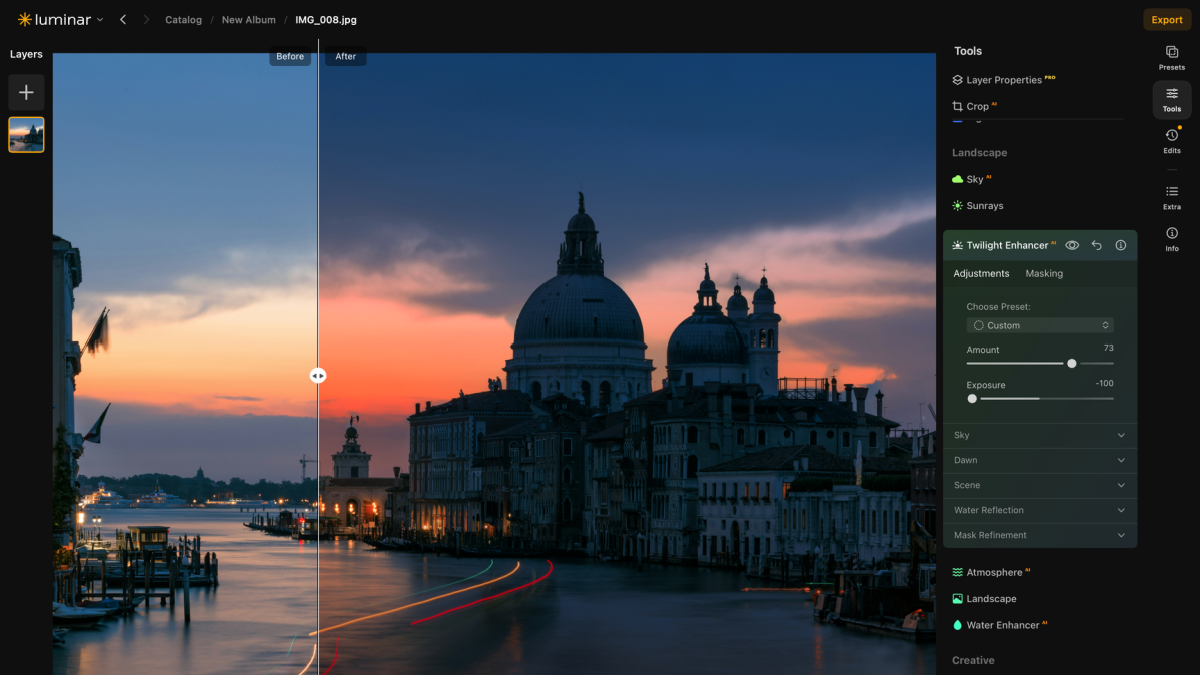
The biggest August 2026 update is a completely redesigned interface that rolled out on August 5th. Catalog and Edit are now unified into a single workspace, with Presets, Tools, Edits, Info, and Extra tools all in one redesigned right sidebar. No more switching between modes. The result is a cleaner, more intuitive workflow with significantly less friction.
Performance improvements come alongside it too: preset previews are up to 4x faster, exports are up to 25% faster, and RAM usage for masking has been reduced. If you found the original interface slightly cumbersome, this update addresses it directly.
Luminar Prime: A New Subscription for Existing Users
Skylum has introduced Prime, a new annual subscription designed specifically for existing users. It replaces the old upgrade pass system with something meaningfully better: while you’re subscribed you get every new feature the moment it ships, and anything unlocked during your subscription is yours to keep even if you cancel later.
Prime includes the Web Editor (coming fall 2026), Creative Assets, AI Assistant 2.0, and ongoing updates.
➡️ Existing users: Get Luminar Prime here
➡️ New users: Get Luminar here
Fall 2026 Updates: Pre-Order Now (Closes August 31)
The Fall Update is currently available for pre-order at up to 50% off and includes some genuinely exciting additions:
Pre-order closes August 31, 2026.

Skylum is a global imaging technology company with over 40 million users in 141 countries.
Their latest software, Luminar, uses AI technology to help both novice and advanced photo editors create their dream images.
For example, you can quickly remove blemishes, whiten teeth, get rid of power lines, dust spots, and other imperfections with just a few clicks.
You can even change the sky!
Another big selling point with Luminar is that its user interface is intuitive and easy to use.
It even works as a plug-in for Photoshop and Lightroom, giving you the best of both worlds.
The best part is that the Skylum team is also continually updating Luminar to keep up with photo editing software, so you know you’re buying with a company who will continue to bring improvements your way.

Before diving into purchasing any editing software, it’s important to figure out why you need one to begin with?
First, think about your experience level with photo editing, and the types of things you hope to accomplish while editing.
For me, the need for beautiful photos for my website and socials is a must, so having more complex editing tools is helpful.
I’m also still fairly new to technical editing, so Luminar is already really appealing with its AI tools.
Before you buy anything, make sure your computer meets the minimum requirements to perform well.
Upgrading your hardware may be necessary before investing in Luminar, especially if you’re using a more vintage computer.

Luminar is a great photo editing software that’s got tons of helpful features and is easy to use.

First, download the Luminar software for your operating system. It’s available for both Mac and Windows.
Once the installation is complete, launching the application will greet you with an intuitive interface that will take you through all the important information.
To edit, you’ll need to import your photos into the Luminar catalog.
Click on the Add Photos button in the top left corner of the screen or go to File > Add Photos in the menu.
Browse your computer to locate the folder containing your images and select the files you want to import.
Luminar will add your photos to its library, making it easy for you to access, organize, and edit your images.
Fair warning though, it doesn’t store the image inside the app, and instead pulls from the computer.
I mistakenly assumed that I saved the image on the application’s system. However, after deleting the original from my computer, I quickly realized that it was no longer available.

If you’re a Windows user, your system should have at least an Intel Core i5 or better processor, 8 GB of RAM, and 10 GB of free hard drive space.
The OS should be Windows 10 or later, and your graphics card should support OpenGL 3.3 or higher. Additional compatibility with DirectX 12 is a plus.
For macOS users, your system should run on macOS 10.14 Mojave or later, with an Intel Core i5 or better processor, 8 GB of RAM, and 10 GB of free hard drive space.
Luminar is a great photo editing software that’s got tons of helpful features and is easy to use.

Luminar’s user-friendly interface and features are ideal for beginner and intermediate users since everything is fairly quick to learn.
If you’re a highly experienced Photoshop user, Luminar might not offer as much creative control as you’re used to with other systems, but let’s be honest, its AI features are still going to be pretty helpful!
Luminar also makes keeping your photos organized a breeze thanks to folders and the search feature that allows you to find images quickly based on keywords.
The presets tab allows you to quickly see a wide range of filters, including a few smart filter suggestions at the top.
You can even create and save your own custom preset filters to save time and keep your photos consistent.
Then last, but certainly not least, you have the Edits tab. Here you’ll find a panel filled with editing options to tweak even the tiniest of features in your photo.

Luminar’s AI-Powered tools are seriously so fun to play around with while editing.
They’re easy to use, and give a quick solution to common editing challenges such as removing power lines, blemishes, or even updating the way the sky looks.
The Sky AI portion of Luminar lets you do things like replace the entire sky, and even change the position the lighting is coming from to make it look as natural as possible.
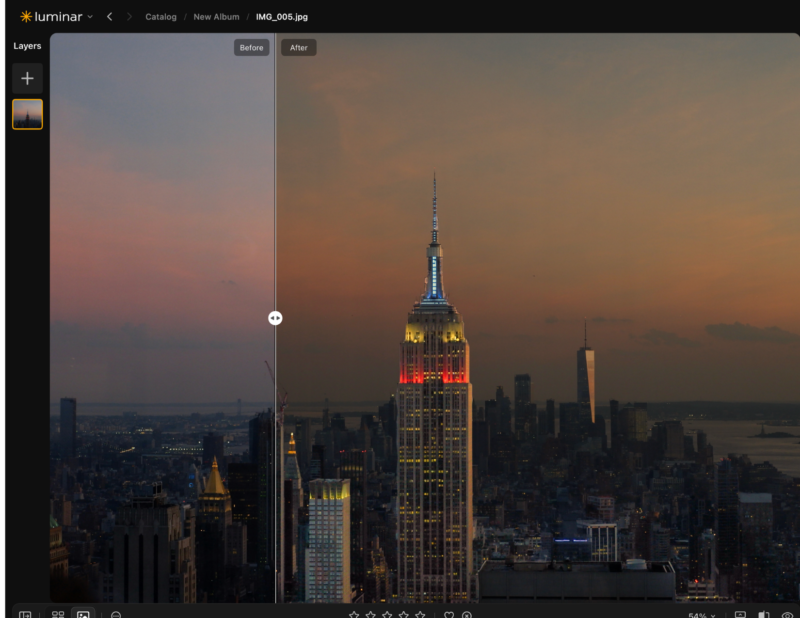
The Relight AI tool is especially amazing to use to give your image the perfect lighting every time. I find it especially useful since while traveling I rarely have the opportunity to wait for the lighting to be perfect before I take my photo.
If you take photos with people in them, you’ll love the Mask AI feature. This built-in tool allows you to create small and very precise adjustments to a photo in order to bring out the best in your subject every time.
While this may not seem like a big deal to those who don’t do a lot of detailed editing, trust me, it’s a massive time saver having AI be able to mask a small and precise area of the photo quickly.
There’s also Portrait Bokeh AI and Body AI, which allows you to create flattering and natural adjustments to the subject’s body and face. These editing options include the ability to easily adjust the waistline, the subject’s teeth and eye whiteness, the shade of their lips, and remove skin blemishes.
Oh, and we can’t forget the Background Removal AI which makes quickly removing a photo’s background a breeze!
Overall, the AI-features on Luminar are going to save you a ton of time when editing.

Skylum has rebuilt its pricing around three one-time purchase tiers for new users, with an optional Prime subscription for existing users.
For new users (one-time purchase):
| Plan | Price | What’s included |
|---|---|---|
| Desktop Only | $129 | Core desktop editing plus the Fall 2026 update |
| All Platforms | $159 | Desktop plus mobile and web apps, lifetime Luminar on Web access |
| Max | $199 | Everything in All Platforms plus a year of Prime, 3,500+ creative assets, 50+ hours of photography courses |
One important note: The AI-powered tools (generative editing, restoration, AI Assistant, and Spaces) come with 365 days of access on every tier. The app itself is permanent and yours forever, but the AI window is not. Worth knowing before you buy.
For existing users — Luminar Prime:
Prime is Skylum’s new annual subscription for existing Luminar users. While subscribed you get every new feature the moment it ships, and anything you unlock during your subscription is yours to keep even if you cancel later. It includes the Web Editor, Creative Assets, AI Assistant 2.0, and ongoing updates.
➡️ Existing users: Get Luminar Prime here
➡️ New users: Get Luminar here
Pre-order the Fall Update before August 31, 2026 to lock in up to 50% off.

Since I first reviewed this software, Skylum has made a significant change worth knowing about: the Extension Pack no longer exists as a separate add-on.
All of those features that used to cost extra, including Noiseless AI, HDR Merge, Magic Light AI, Panoramic Stitching, Background Removal AI, Supersharp AI, and Focus Stacking, are now integrated directly into the base software depending on your license tier.
Noiseless AI reduces or eliminates noise from photos with simple slider adjustments, with the software recommending optimal settings automatically. Genuinely useful for low-light travel photography where grain is unavoidable.
Magic Light AI remains one of my favorite features. It adds dynamic lighting effects to your photo, perfect for highlighting street lamps, adding dramatic rays to headlights, or drawing attention to a specific subject. Full control over intensity, size, glow, and beam width.
HDR Merge lets you combine up to ten bracketed images into a single high-dynamic-range photo with automatic alignment, ghost reduction, and tone mapping. A major time saver for landscape photographers.
Panoramic Stitching blends up to 100 images, supports videos, and even lets you create HDR panoramas for challenging lighting conditions.
Background Removal AI makes removing a photo’s background genuinely quick and precise.
Supersharp AI corrects blur caused by movement, missed focus, or camera shake across the whole image.
Which of these tools you get access to depends on your license tier, so check Skylum’s current pricing page before purchasing to confirm what’s included at each level.
Luminar is a great photo editing software that’s got tons of helpful features and is easy to use.

Luminar on Mobile has come a long way since I first reviewed this software. It’s now a proper platform in its own right rather than just a companion app, with real editing capabilities on your phone or tablet.
The cross-device license (All Platforms) gives you mobile and web editing alongside the desktop app, making it a genuinely versatile editing suite for photographers who work across multiple devices.

To save completed editing projects, simply go to File > Save and choose the desired location to save your project.
When you’re ready to share your edited images, Luminar has a few options to choose from. You can choose from file formats like JPEG, PNG, and TIFF.
In the Export dialog box, you can select your preferred format, adjust the quality, and set additional options like color profile and resizing.
Skylum Luminar Alternatives

One popular editing software that everyone’s heard of is Adobe Lightroom. They’re known for having powerful editing tools and seamless integration with Adobe Photoshop.
With their software, you’ll find advanced features like layer editing, color correction, and a wide variety of presets and filters.
If you’re not an experienced editor though, you may find this overwhelming.
Capture One is popular with professional photographers for its outstanding raw photo processing.
It offers advanced color management, tethered shooting, and a highly customizable user interface.
If you’re super serious about your photography, and already have editing skills, this program could be the perfect fit.
If you like having a lot of presets though, keep looking as this one doesn’t have many.
Are you looking for a free or open-source alternative? Give Darktable a try.
It’s a powerful RAW photo processor and editor with a bunch of complex tools you can use for free.
The downside is that because it’s free, it doesn’t always have the latest updates or trendy filters available.
Luminar is a great photo editing software that’s got tons of helpful features and is easy to use.

Luminar is a great photo editing software that’s got tons of helpful features and is easy to use.
One of its big strengths is its AI-powered tools, which streamline your editing process, saving you time and energy.
I love that they have tons of filters you can mess around with, and they even offer suggested ones based on your photo.
I like to find one I like, then go into the editing portion to see what changes the filter made.
This helps me learn what aspects of the photo to look at and play with when I’m editing on my own.
Luminar’s AI technology also makes it super easy to zero in on a specific feature in the photo when you want to edit little details.
Overall, it’s such a fun and easy way to edit photos, especially if you’re just learning all the finer details of manually editing images.
Luminar is a great photo editing software that’s got tons of helpful features and is easy to use.
Yes! Luminar is one of the most beginner-friendly photo editing software options available. Its AI-powered tools do a lot of the heavy lifting for you, and the interface is intuitive enough that you can get started without any prior editing experience.
Luminar offers both one-time purchase options and a subscription model. For new users, one-time purchase tiers start at $129 for Desktop Only, $159 for All Platforms, and $199 for Max. Existing users can also subscribe to Luminar Prime for ongoing updates and new features.
Yes, Luminar works as a plugin for both Adobe Lightroom and Photoshop, giving you the best of both worlds if you already use Adobe software.
Yes, Luminar is available for both Mac and Windows. Make sure your system meets the minimum requirements before purchasing.
Luminar Neo has been rebranded to simply Luminar as part of Skylum’s move to unify their software under one brand across Desktop, Mobile, and Web platforms. The software itself is the same, just with a cleaner name and a more unified experience going forward.
Luminar is a great photo editing software that’s got tons of helpful features and is easy to use.
This list will provide you with all you need to know about the best travel hashtags to use when posting to socials. Get ready for tons of new likes and follows!
A solo travel expert shares tips on how to take good pictures of yourself while traveling solo: the gear, apps, angles, and the tricks that actually work.
If you’re in the market for a stabilized selfie stick, then you need to check out this Zhiyun Smooth XS review to find out if this is the selfie stick for you!
Are you wondering if the GoPro HERO 9 is worth investing in? Read this GoPro HERO 9 review to find out if this action camera is worth your hard earned cash.
I’ve listed all the solo travel tips I’ve learned since my first solo trip five years ago. This is the only guide you need before tackling your next solo trip!
Are you struggling to decide what to wear on vacation? I've got all the vacation outfit ideas you need to inspire the perfect packing list for your trip!
Leave a Comment